Assignment #1: Top 5 photos on your phone currently...upload to computer. Call this Top 5 (5 marks)
Assignment #2 : Find one object or person to shoot outside, shoot them 5 different ways, then choose your best photo and title it BEST (5 marks)
Assignment #3 : Mini scavenger hunt...take a photo of: HUNT#1
(10 marks)
1. something red
2. something round
3. something that has texture
4. shoot something while laying on the ground
5. something architectural
6. snow shot
Assignment #4: Headshots 5: you are to take 5 headshots and crop them all the same for head and shoulders. put in folder and label Headshots (10 marks)
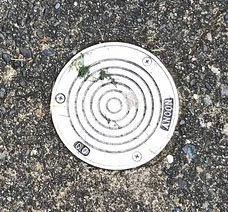
Assignment # 5: Circles Squared, 5 shots make sure the circle is shot directly top down or head on. 5 shots (10 marks)
Assignment # 6: 5 - 5 sec videos shot horizontally connected to school. HORIZONTALLY!!!!! Videos should include movement.
School video (10marks)
Example: opening the door to the school, opening a locker, someone taking a photo, kicking a ball, someone walking down the hall, doing a math problem, typing on the computer, etc. Upload to the mdrive in your folder and label School video
MAKE SURE ALL PHOTOS ARE EDITED, FOLDERS ARE LABELED PROPERLY....HAVE THE TEACHER LOOK THEM OVER AND OFFER A CRITIQUE.
You are to take 5 well composed photos of things that are round and then crop them in a square format. Try to be creative, try objects with different colours or textures.
Continue working on these Assignments (they are not due this week)
Assignment #1: Top 5 photos on your phone currently...upload to computer. Call this Top 5 (5 marks)
Assignment #2 : Find one object or person to shoot outside, shoot them 5 different ways, then choose your best photo and title it BEST (5 marks)
Assignment #3 : Mini scavenger hunt...take a photo of: HUNT#1
(10 marks)
1. something red
2. something round
3. something that has texture
4. shoot something while laying on the ground
5. something architectural
6. a shadow
Assignment #4: Headshots 5: you are to take 5 headshots and crop them all the same for head and shoulders. put in folder and label Headshots (10 marks)
MAKE SURE ALL PHOTOS ARE EDITED....HAVE THE TEACHER LOOK THEM OVER AND OFFER A CRITIQUE.
Photo composition is how a photographer arranges visual elements within their frame. “It's a pleasing organization of objects within your rectangle.
Understanding Rule of thirds
The rule of thirds is a composition guideline that divides an image into nine equal parts to help create a well-balanced and visually interesting image.
Divide the image into nine equal parts using two horizontal and two vertical lines
Place the subject in the left or right third of the image
Place important elements along the lines or at their intersections
Why it works
Helps balance the subject with negative space
Draws the viewer's eye to the main focal point
Creates more tension, energy, and interest
How to use it
Most cameras and phones have a rule of thirds setting
In landscape photography, the horizon line is often placed on a thirds line
Example of Rule of Thirds
WATCH THIS VIDEO ON COMPOSITION
Continue working on these Assignments (they are not due this week)
Assignment #1: Top 5 photos on your phone currently...upload to computer. Call this Top 5 (5 marks)
Assignment #2 : Find one object or person to shoot outside, shoot them 5 different ways, then choose your best photo and title it BEST (5 marks)
Assignment #3 : Mini scavenger hunt...take a photo of: HUNT#1
(10 marks)
1. something red
2. something round
3. something that has texture
4. shoot something while laying on the ground
5. something architectural
6. a shadow
Assignment #4: Headshots 5: you are to take 5 headshots and crop them all the same for head and shoulders. put in folder and label Headshots (10 marks)
Photography is not about the camera but how you use the camera. You can have an expensive camera and still take bad pictures. The focus of this course is not on the many technical aspects of how to use a camera but rather on how to compose great shots and extending your knowledge into creating using photography as a medium.
We will be learning how to use and expand the use of Photoshop and other editing programs to create advertising, a magazine cover, videos, and conceptual photographic art.
The visual world is becoming part of our everyday life. Most people on the internet are focused on photos and video to get across ideas. Logos and photos are an instant way for people to get an idea across. It is important for young people to be able to navigate the ever increasing world of visual literacy.
Requirements of this course:
a decent digital slr or camera phone for taking photos, school cameras will be allowed to go home with permission.
a usb drive and/or an extra phone cord for use at school for transferring photos
a card reader/phone cable at school for transferring photos to the school computer
the ability to use some of your time to take photos outside of school
a desire to learn and grow through digital media
ability to work with others and be a good model
time management skills
You may want to install the Flickr app on your phone for faster digital uploads, but this is not a requirement
Assessment:
This course is assessed based on student's ability to push boundaries, meet assignment deadlines and progress in their ability to become better photographers/videographers and visual artists. Students are expected to push themselves at the level they are at to improve and produce quality work. A high standard is expected, and poor quality work will not be accepted. You will be asked to Re-do an assignment if it does not meet expectations.
Deadlines: work will be accepted late up to one week after the assignment deadline, after that a phone call home will happen.
FYI:
To set your Apple devices to take photos in JPEG/JPG instead of HEIC: Go to Settings,Tap Camera,Tap Formats,Tap Most Compatible
Introduce Flickr app
Create a folder on the M drive
Drag Photoshop to the desktop
Assignment #1: Top 5 photos on your phone currently...upload to computer. Call this Top 5 (5 marks)
Assignment #2 : Find one object or person to shoot outside, shoot them 5 different ways, then choose your best photo and title it BEST (5 marks)
Assignment #3 : Mini scavenger hunt...take a photo of: HUNT#1 (10 marks)
1. something red
2. something round
3. something that has texture
4. shoot something while laying on the ground
5. something architectural
6. a shadow
Assignment #4: Headshots 5: you are to take 5 headshots and crop them all the same for head and shoulders. put in folder and label Headshots (10 marks)
Edit your photos, try not to just get the job done, but to make your photos interesting and well composed.
Beauty in a minute video: 40-60 sec: 35 marks. 40 one second clips of slice of life moments clipped together in a video...make sure your video has a beg/middle/end and the music works with your clips DUE:WED JAN 22 presented in class
Photo recreation: 10 marks
Top 10 photos of the year (must have been taken during this class your choice 10 marks)
Portraits Due: Working with a model of your choice, you should plan to set up a portrait shoot. You will need10 different shots of one model. Plan to shoot a variety of different shots including but not limited to: a couple of head shots, several full body shots, creative shots using the lcd projector/costumes/props etc. Study other portrait photographer's work and learn how to effectively pose your model. This assignment is worth 20 marks.
Tips:
plan your shots/shoot
be aware of where the light is ( best times to shoot dawn and dusk)
choose a good background
use a prop ( umbrella, hat, scarf, pumpkin etc)
shoot people in their element ( skateboarder with a skateboard at the skatepark)
create a rapport with your model and direct the shoot, which means tell the model what you want them to do.
So maybe you can research posing and plan your model and location. If you have done your shoot, you should spend some good quality time editing. If you are doing your portraits at school, find someone to photograph and get busy. There are lots of places to shoot around the school. ( skate park, woods, garage door near the soccer clubhouse, metal storage containers on the soccer fields. )
Beauty in a minute video:40-60 sec: 35 marks. 40 one second clips of slice of life moments clipped together in a video...make sure your video has a beg/middle/end and the music works with your clips DUE:
Photo recreation: 10 marks
Macro shots: The macro shots are not traditional macros but rather close-ups. I want you to try to look at ordinary everyday objects in an extraordinary way. Play with camera angles, be very aware of your backgrounds. This might be a good time to try using manual focus on your camera slowing down the process of taking pictures just a little. Take an object, compose the shot, make sure you bring in lots of light or use the light tent, edit and put into a folder on your m drive.
Photo Re-creation: You are to find an old photo of yourself between the ages of 3-7 years of age. You are then going to take a photo of the photo on your phone. Next you are to recreate the photo to the best of your ability. I am looking for a solid rendition. You may have to get someone to help with taking the photo if you are in the photo.